Encryption in transit
TLS 1.2 / 1.3 protects SIP signaling; SRTP protects voice media. Individual extension passwords and Digest authentication are supported.
TLS + SRTPOne server. A voice network you control.
Simple, reliable SIP communication.
Built for your own network.
Complex protocols. A simple experience.
The essentials for self-hosted voice, from signaling to media.
TLS 1.2 / 1.3 protects SIP signaling; SRTP protects voice media. Individual extension passwords and Digest authentication are supported.
TLS + SRTPA minimal SIP server built with memory-safe Rust and the Tokio async runtime, without garbage collection.
RUST NATIVEDeploy on your own VPS and manage internal extensions. Make voice calls and send SIP text messages, with temporary offline queuing and redelivery.
SELF-HOSTEDEncryption note: the server decrypts and re-encrypts relayed media, so it is part of the trust boundary. This is not end-to-end encryption. Offline messages are held in memory and lost on restart.
Start with a server that exposes fixed TCP / UDP ports.
Bring MingHe online with Docker Compose.
Clone the repository and install Docker and Compose.
Set the server IP, media address, and extension passwords.
Use a SIP client that supports TLS and SDES-SRTP.
# 01 Get the source
git clone https://github.com/619dev/minghe.git
cd minghe

# 02 Prepare configuration
mkdir -p config
cp config.template.toml config/config.toml

# Set host, media_addr, and all enabled passwords
vim config/config.toml

# 03 Build from current source and start
docker build -t facilisvelox/minghe:latest .
docker compose up -d

docker compose logs -f5061 / TCP SIP signaling · 20000–20020 / UDP Voice media
Public port mappings must match your configuration. Vercel hosts this website; the MingHe service requires a VPS with UDP support.
Bria Mobile is recommended for iOS and Android.
Install the app, configure your MingHe account, and start calling.
Connect your iPhone or iPad to a MingHe extension and make or receive SIP calls over Wi-Fi or cellular data.
Download on the App Store ↗Add SIP calling to your Android device. Connect to MingHe with your server address, extension number, and password.
Get it on Google Play ↗Add a SIP account in Bria Mobile and match the encryption settings to your server configuration.
Bria Mobile requires an app-store subscription. Pricing and availability depend on your region. For a self-signed certificate, import and trust the server certificate and keep TLS verification enabled. Official user guides ↗
Prefer a dedicated SIP handset?
Explore this portable 4G phone from Tantuns.
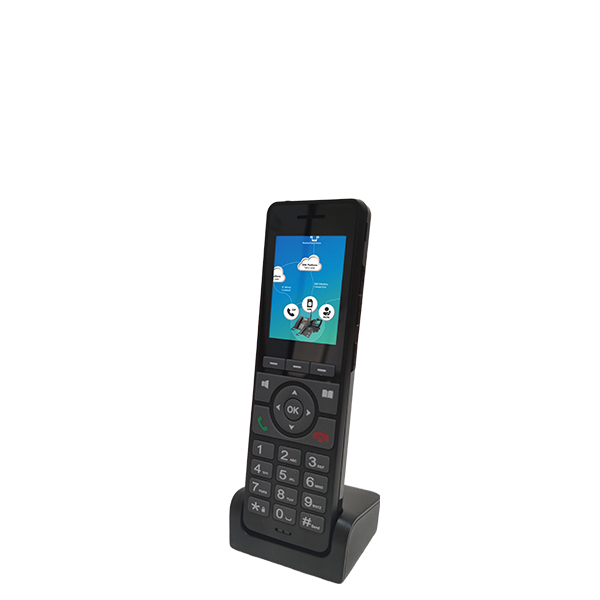 Focused on voice · Ready to go
Physical keys and a portable design bring SIP calling into everyday use. Cellular and Wi-Fi connectivity offer flexible options for mobile teams.
Before purchasing: the manufacturer confirms SIP support. Verify TLS, SDES-SRTP, and certificate trust settings with the vendor and test them with MingHe. This is a hardware suggestion, not a compatibility certification.
This website can be deployed directly to Vercel. The MingHe SIP server needs a fixed TCP signaling port and a fixed UDP media port range. Use a suitable VPS or your own server.
The project recommends Bria Mobile and Linkvil W610W / W620W. Other clients need SIP over TLS, SDES-SRTP, and appropriate certificate trust settings. These capabilities need separate verification for the Tantuns H5.
Import certs/server.crt from your server as a trusted certificate in your client and keep certificate verification enabled. Update client trust after renewal. For public deployments, use a certificate from a trusted CA.
Yes. MingHe is open source under the Apache-2.0 license. Visit GitHub to read the code, report issues, or contribute.